Know what affects your software. Decide what to fix and ship.
VulnBeacon is a software supply-chain security and vulnerability intelligence platform for the product-security and engineering teams responsible for the software their organisation builds and receives from suppliers. It connects the inventory your tools already produce to the security decisions your team has to make. Start with an SBOM, a supported lockfile or scanner output.
Use the web workspace, connect your pipeline, or ask your AI assistant.
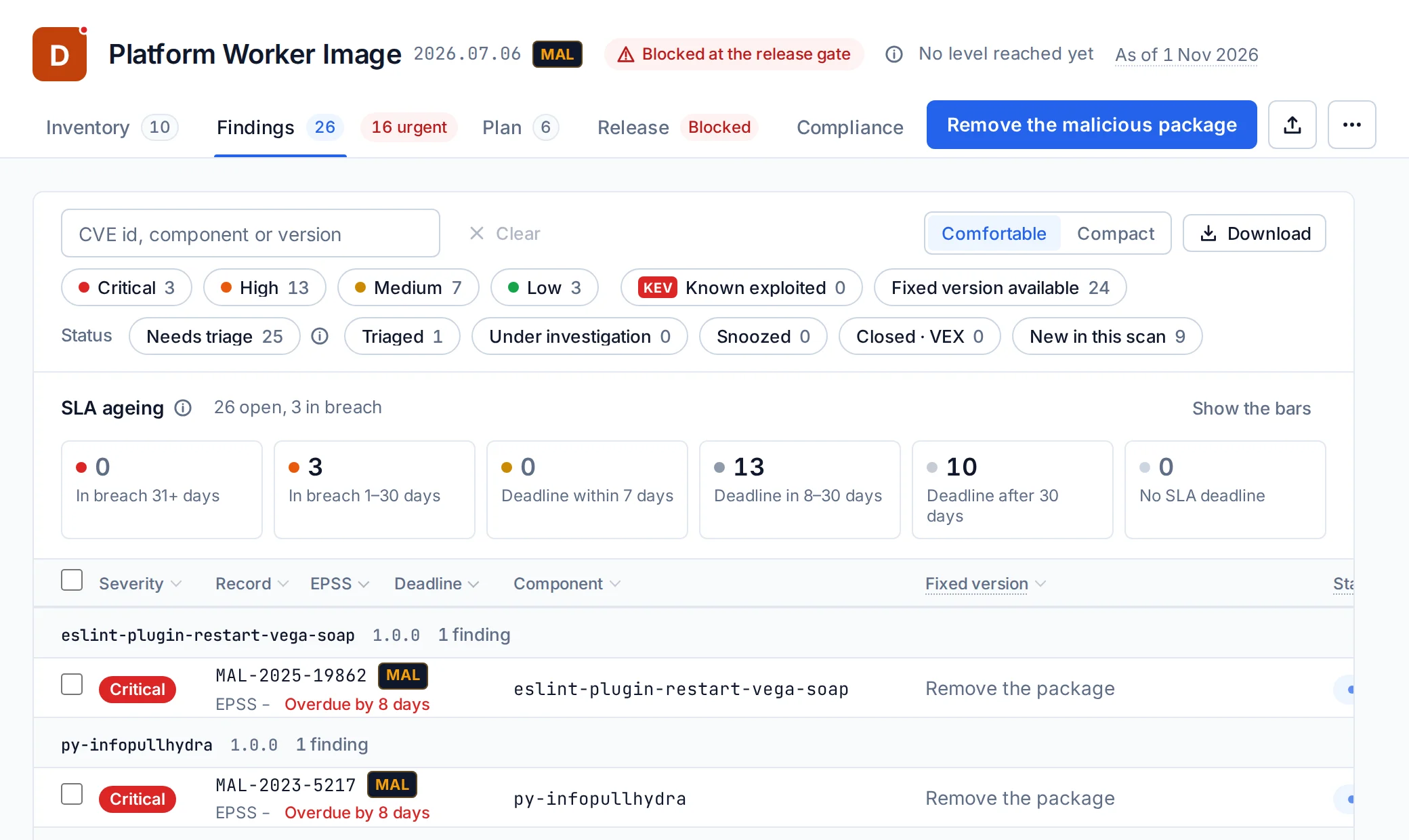
The web workspace on one product: its findings, its plan, its release result and its compliance, with nothing to install. No assistant needed.
-
You
Create the SBOM of the project I am working on and check it with VulnBeacon. Can I ship it?
-
Assistant
This SBOM passes the release policy configured for Checkout service. Worth doing next: upgrade Django 5.2.13 to 5.2.17, which clears 15 findings.
- Upgrade
Django 5.2.13 → 5.2.17clears 15 - Upgrade
urllib3 2.2.1 → 2.8.0clears 9 - Upgrade
sqlparse 0.5.3 → 0.6.0clears 6
- Upgrade
-
How the assistant answered4 calls, 6.0 s
-
cyclonedx-py requirements requirements.txt --of JSON -o sbom.cdx.jsonGenerated sbom.cdx.json with cyclonedx-py from requirements.txt: 26 components.
2.1 s
-
upload_sbomproduct_id: 1, sbom: sbom.cdx.json, branch: mainUploaded as generation 1: 26 components, the scan queued.
144 ms
-
product_gateproduct_id: 1Passed: assessed, no rule broken.
280 ms
-
product_remediationproduct_id: 18 components to act on. Django 5.2.13 to 5.2.17 clears 15 findings.
131 ms
-
Recorded on an example project, a Django checkout service of 26 components: the assistant made its SBOM, uploaded it and read the verdict. Every line is the product's answer.
-
You
CVE-2026-67320 is in the news. Which of our products ship it?
-
Assistant
3 of your 11 products ship CVE-2026-67320: Patient Portal (axios 1.16.0, fixed in 1.18.0), Atlas Storefront (axios 1.16.0, fixed in 1.18.0) and Platform Worker Image (axios 0.32.0, fixed in 0.33.0). A fixed version exists for 3 of them.
- Patient Portalhigh
axios 1.16.0fix available - Atlas Storefronthigh
axios 1.16.0fix available - Platform Worker Imagehigh
axios 0.32.0fix available
- Patient Portalhigh
-
How the assistant answered1 call, 97 ms
-
incident_impactcve_id: CVE-2026-673203 of 11 products affected, 3 with a fix available.
97 ms
-
Recorded on example products: one question, asked of all of them, answered from their inventories.
-
You
Why is the release gate blocking Platform Worker Image, and what should we fix first?
-
Assistant
The release gate blocks Platform Worker Image. Rules broken: malicious packages (eslint-plugin-restart-vega-soap@1.0.0, py-infopullhydra@1.0.0). First remove eslint-plugin-restart-vega-soap@1.0.0 and py-infopullhydra@1.0.0: no upgrade clears a malicious package. Then upgrade openssl 3.0.19-1~deb12u2 to 3.0.20-1~deb12u2, which clears 9 findings. Check the release again once that is done.
- Remove
eslint-plugin-restart-vega-soap@1.0.0 - Remove
py-infopullhydra@1.0.0 - Upgrade
openssl 3.0.19-1~deb12u2 → 3.0.20-1~deb12u2clears 9
- Remove
-
How the assistant answered3 calls, 1.4 s
-
list_products11 products.
131 ms
-
product_gateproduct_id: 10Blocked: max_malicious.
1.2 s
-
product_remediationproduct_id: 106 components to act on. openssl 3.0.19-1~deb12u2 to 3.0.20-1~deb12u2 clears 9 findings.
125 ms
-
Recorded on the example product Platform Worker Image: the gate's verdict and the plan's first lines.
What you can do with it
Already use a scanner? Your scanner produces the inventory. VulnBeacon connects it to updated intelligence, identifies affected products, prioritises the work, tracks remediation, and produces the evidence behind your release decision.
- Investigate exposureA vulnerability is announced. See which products ship it, at which version, and whether a fix exists.For security engineers
- Prioritise and track fixesChoose the upgrades that clear the most findings, file them as tickets, and see whether they landed.For engineering leads and security managers
- Control dependencies and releasesCheck every pull request and every release against the rules you set.For engineering leads
- Assess suppliersJudge the software your suppliers deliver against consistent requirements.For supplier-assurance owners
- Prepare security evidenceGive customers and auditors the facts behind your product security.For security managers
Explore a sample product assessment: one fictional product from its inventory to its report, with the files to open.
One incident, start to finish
When something new lands, know what it touches
A vulnerability makes the news, or a package turns out to be malicious. Ask one question of everything you ship, and get the answer from your own inventories.
An incident, across every product
Give VulnBeacon a CVE or any of its aliases, a package name or a purl. It answers which of your products ship it, which component at which version, whether the record is on the KEV catalogue and whether a fix exists. A record’s page lists your affected products too, and the API and the assistant give the same answer.
Your software stays the same. Its known risks do not.
When the record changes, the inventories you already uploaded are matched again, and again every night. A new finding appears without a new build, its deadline counted from the day it was first seen.
-
You
CVE-2026-67320 is in the news. Which of our products ship it?
-
Assistant
3 of your 11 products ship CVE-2026-67320: Patient Portal (axios 1.16.0, fixed in 1.18.0), Atlas Storefront (axios 1.16.0, fixed in 1.18.0) and Platform Worker Image (axios 0.32.0, fixed in 0.33.0). A fixed version exists for 3 of them.
- Patient Portalhigh
axios 1.16.0fix available - Atlas Storefronthigh
axios 1.16.0fix available - Platform Worker Imagehigh
axios 0.32.0fix available
- Patient Portalhigh
-
How the assistant answered1 call, 97 ms
-
incident_impactcve_id: CVE-2026-673203 of 11 products affected, 3 with a fix available.
97 ms
-
Recorded on example products: one question, asked of all of them, answered from their inventories.
-
You
What is new on my watch list for openssl?
-
Assistant
618 records match openssl. The newest is CVE-2026-86410 (high).
CVE-2026-86410highCVSS 8.1CVE-2026-92387highCVSS 8.1CVE-2026-92386highCVSS 8.1CVE-2026-86412highCVSS 8.1CVE-2026-86409highCVSS 8.1
-
How the assistant answered2 calls, 162 ms
-
list_watchlists3 watch lists.
49 ms
-
watchlist_changeswatchlist_id: 3, per_page: 5618 records match openssl.
113 ms
-
Recorded on an example watch list: the records that match a name you follow, newest first.
Where the risk sits across your products
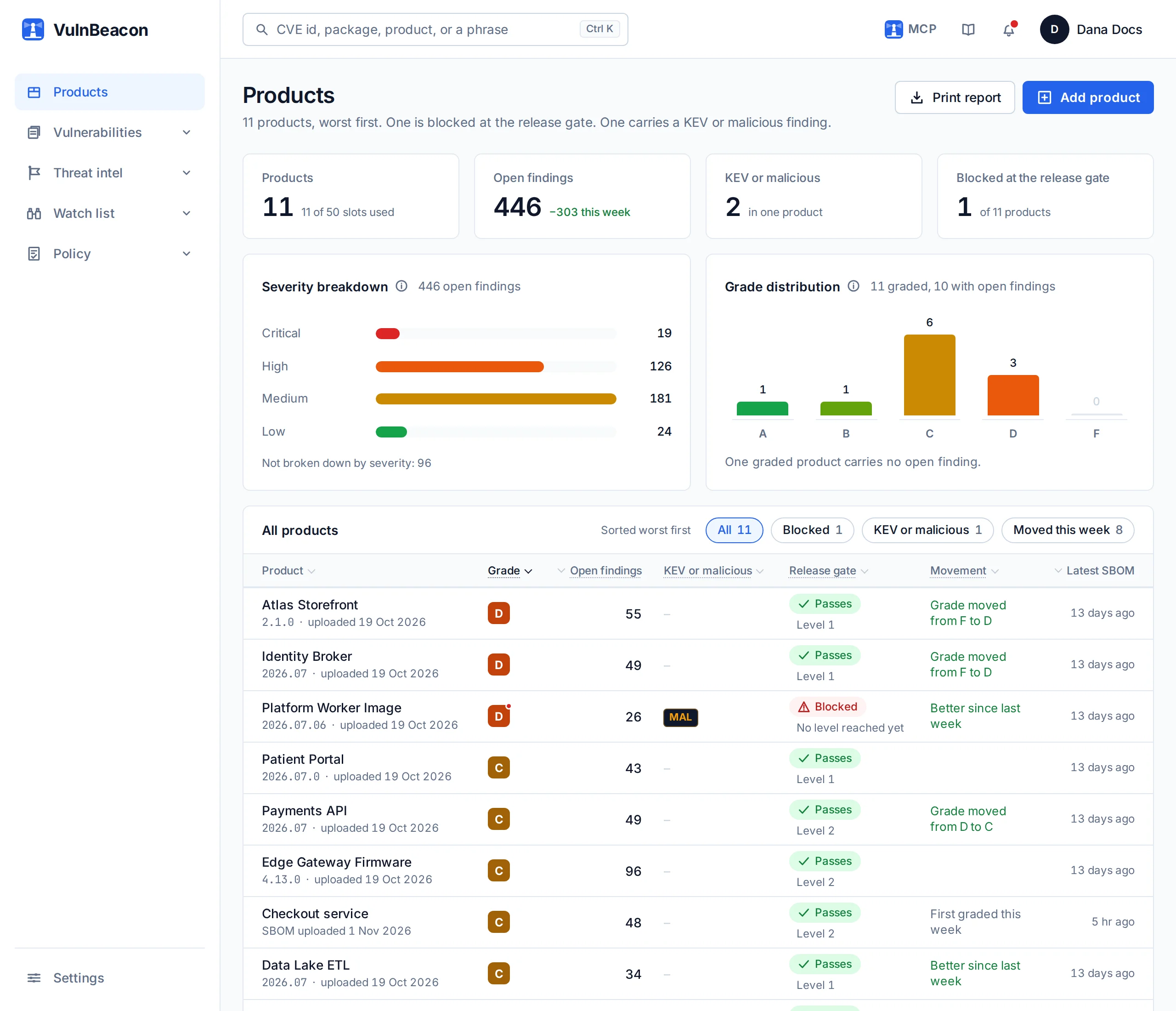
The Products page ranks everything you ship, worst first: its grade, its open findings, anything exploited or malicious, its release gate and what moved this week. It prints as a report for the people who were not in the room.
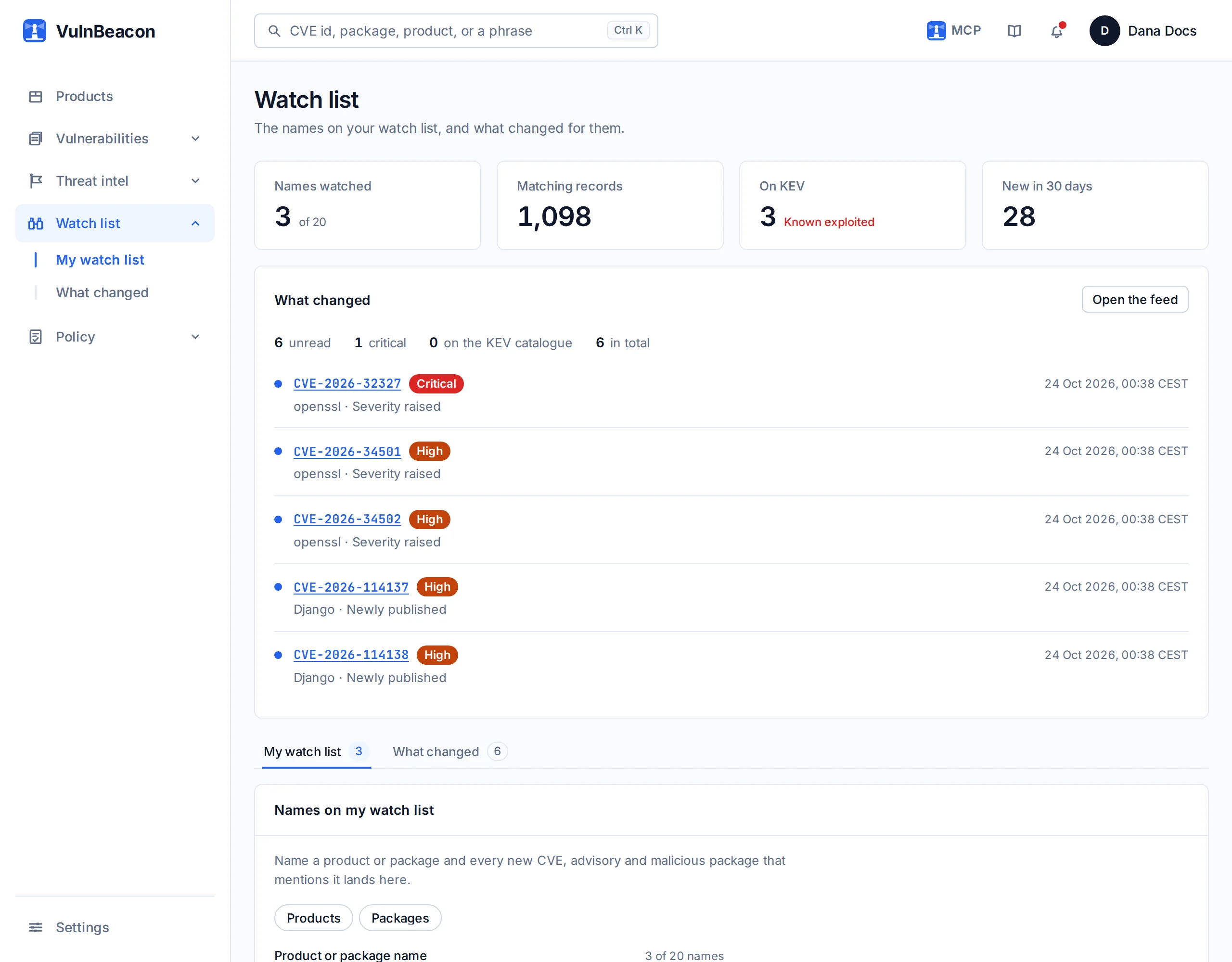
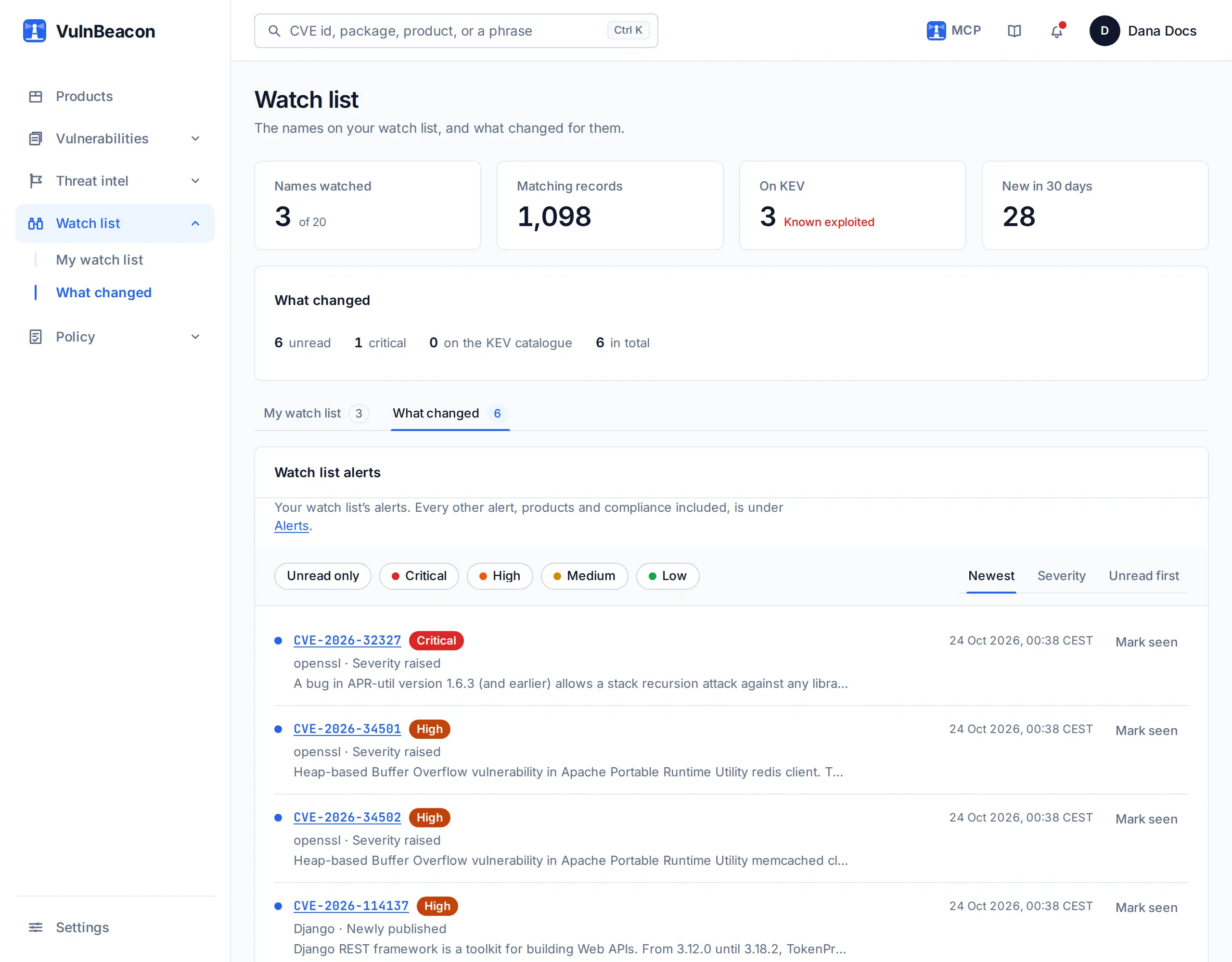
Your watch list
Name the products and packages you care about. A new record that names them, a fixed version, a listing on the KEV catalogue: each one reaches you at the cadence you choose, in the application, by e-mail or through your integrations. The record itself is updated as your administrator schedules it.
One upload, the release decision end to end
Upload a CycloneDX or SPDX SBOM, a supported lockfile, a component CSV or what Syft, Trivy or Grype produced, or let the pipeline send it. Everything below is computed from that one file and the record, and every figure opens to the facts behind it. When a document declares cryptographic assets, services or AI models, those are inspected too. The products on these screens are demonstration products on our own instance; the record and its figures are real.
A grade, with its reasons
Each product gets a letter from A to F. It weighs what the findings are, not how many there are: a finding already exploited in the wild and a malicious package in the inventory pull the grade down hardest. The letter opens to the list of what moved it, and every finding carries its SLA deadline and its fixed version.
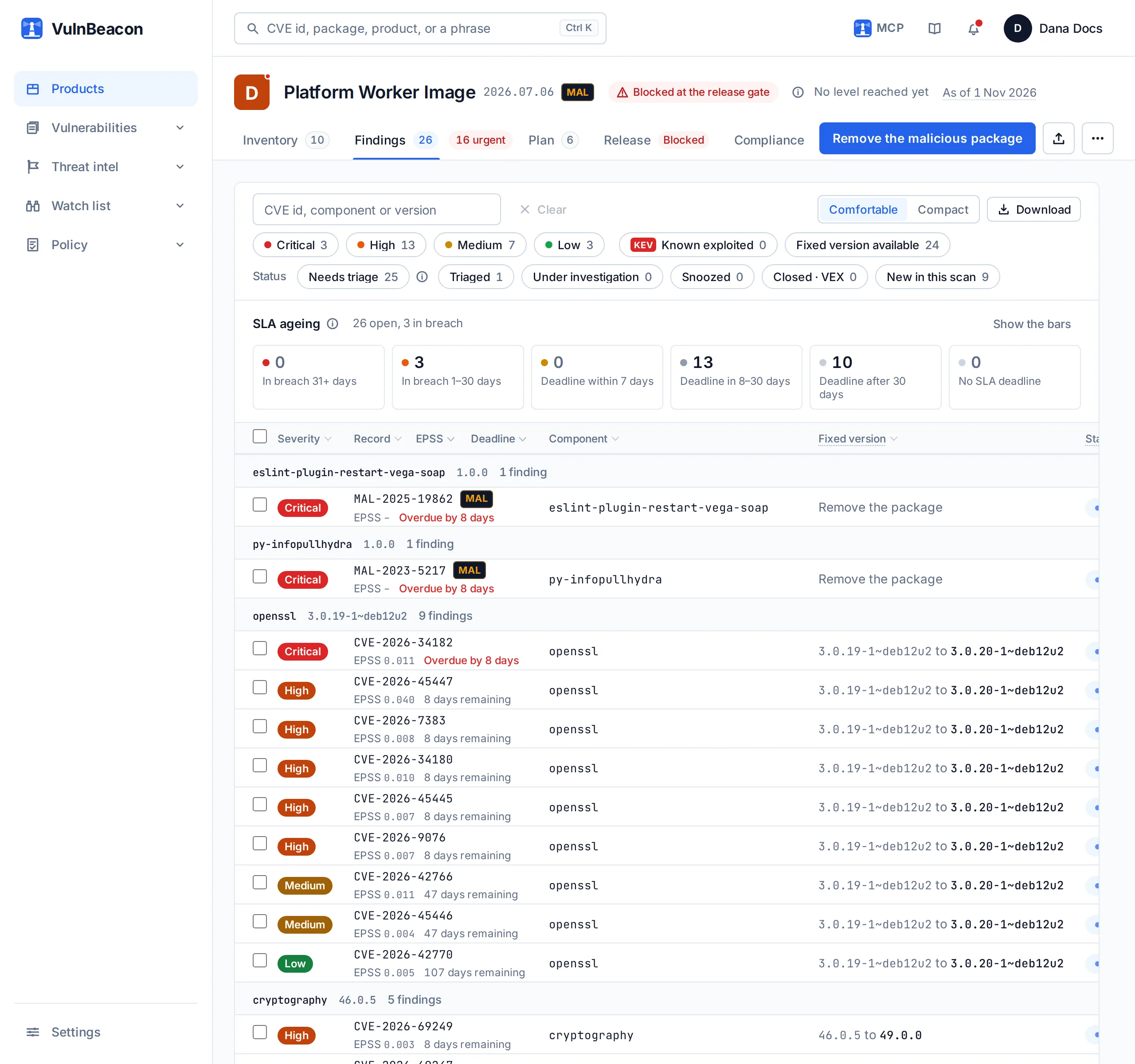
A prioritised remediation plan
Findings are grouped by the upgrade that closes them, and the upgrades are ranked by how much each one clears. Remediation follows them from there.
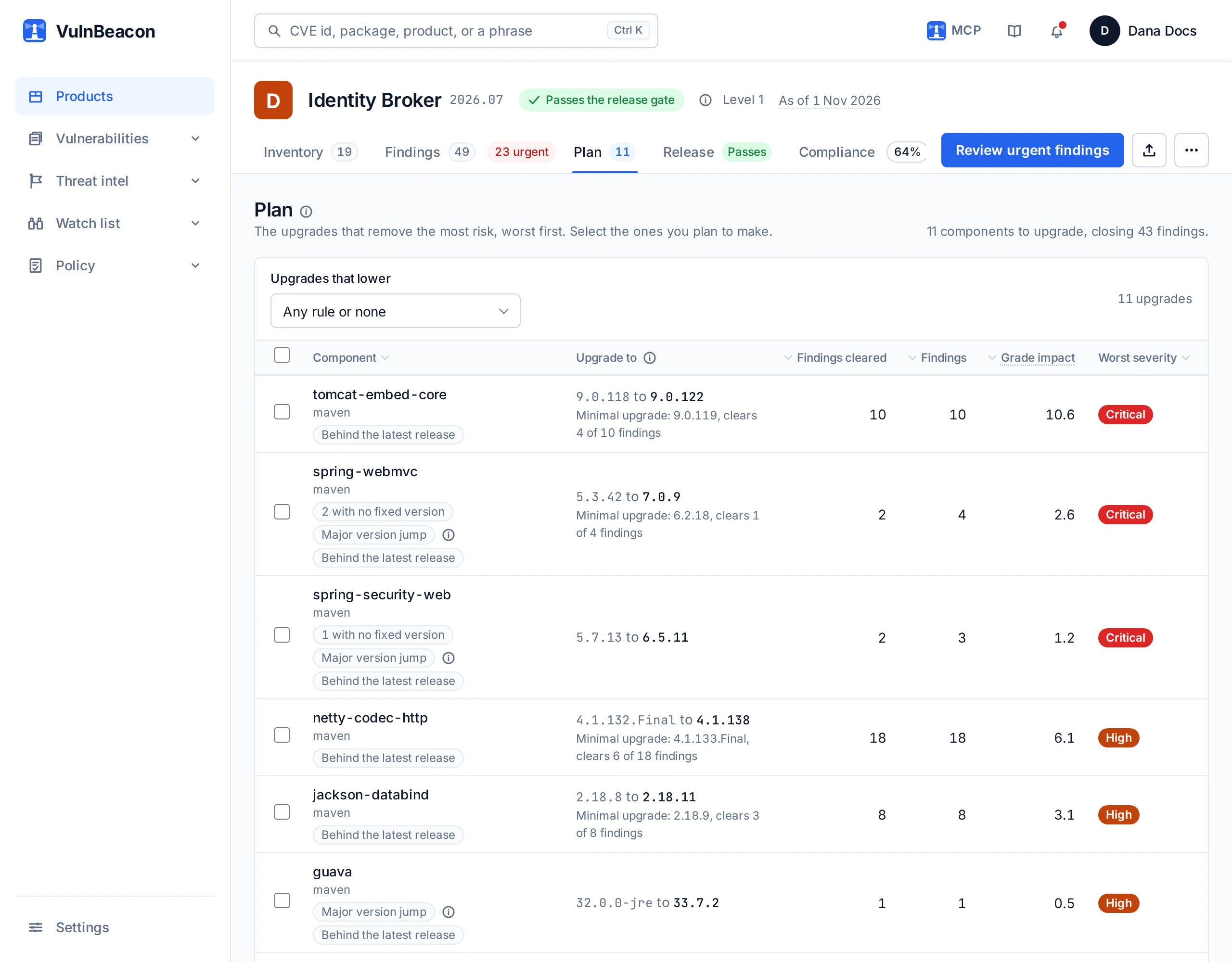
A release gate on rules you set once
Your organisation decides what may ship: how many exploited findings, how many critical ones, how long a high finding may stay open, which packages are never allowed. The gate reads the newest SBOM generation against those rules and answers passes or blocked, naming the rule and what to change. Until the scan of the newest generation is finished, the answer is not assessed, never a pass.
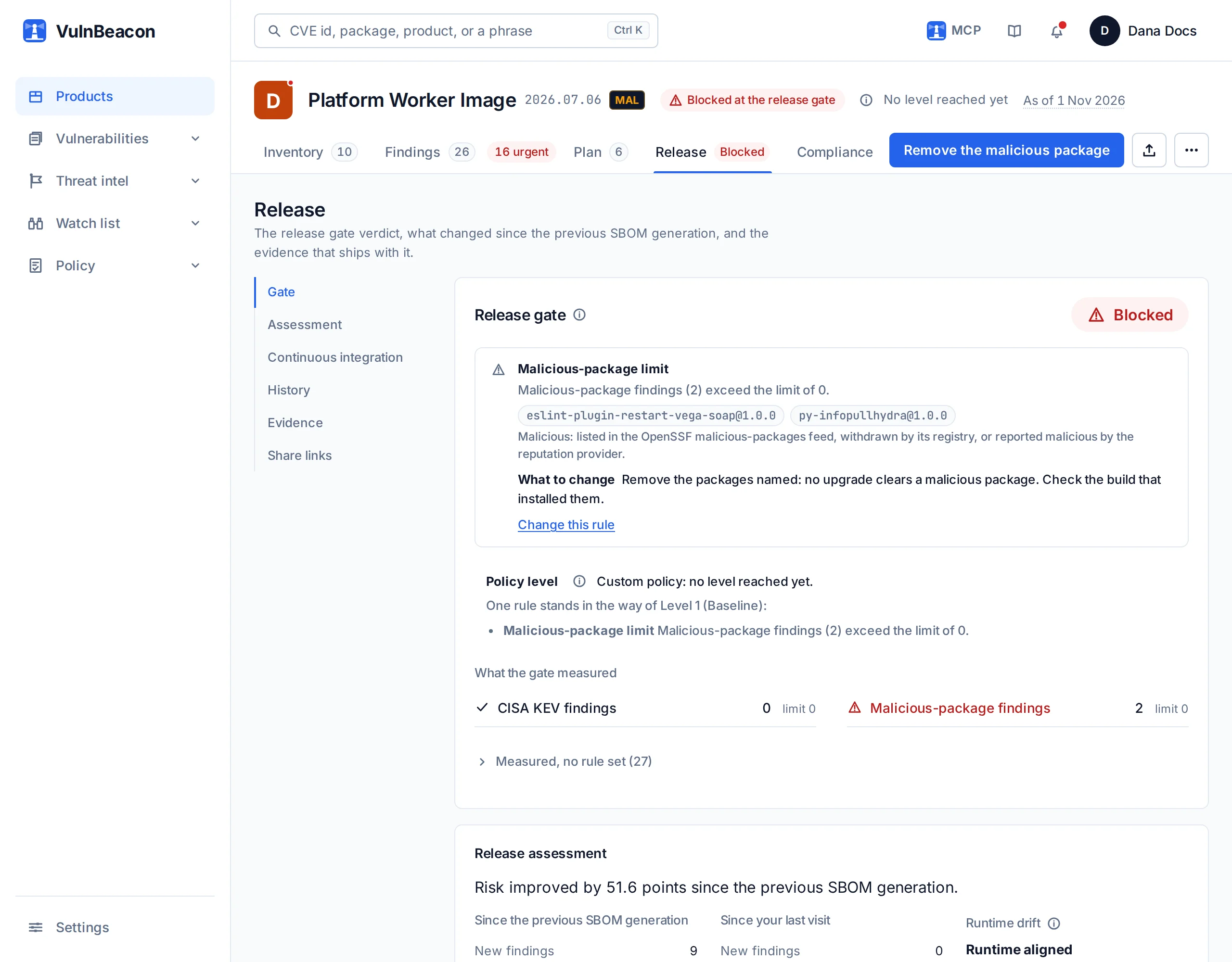
Evidence, not assertion
Every document reads the same evidence check before it states anything. When the findings behind a figure are incomplete, the document says so under its title; it never certifies from rows it does not have. The VEX, the SARIF, the vulnerability disclosure report, the evidence pack and the printable reports are dated and carry the product's name.
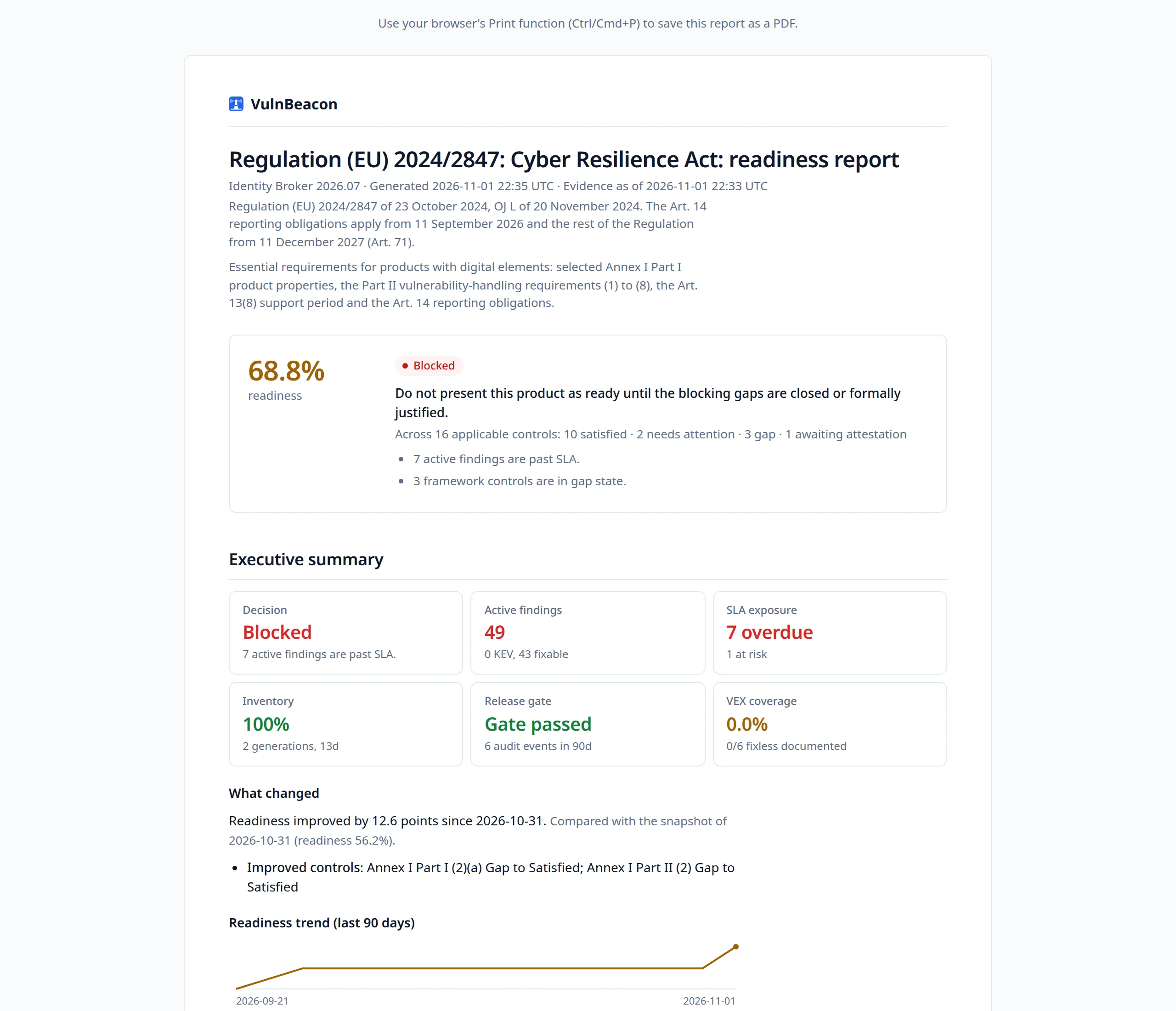
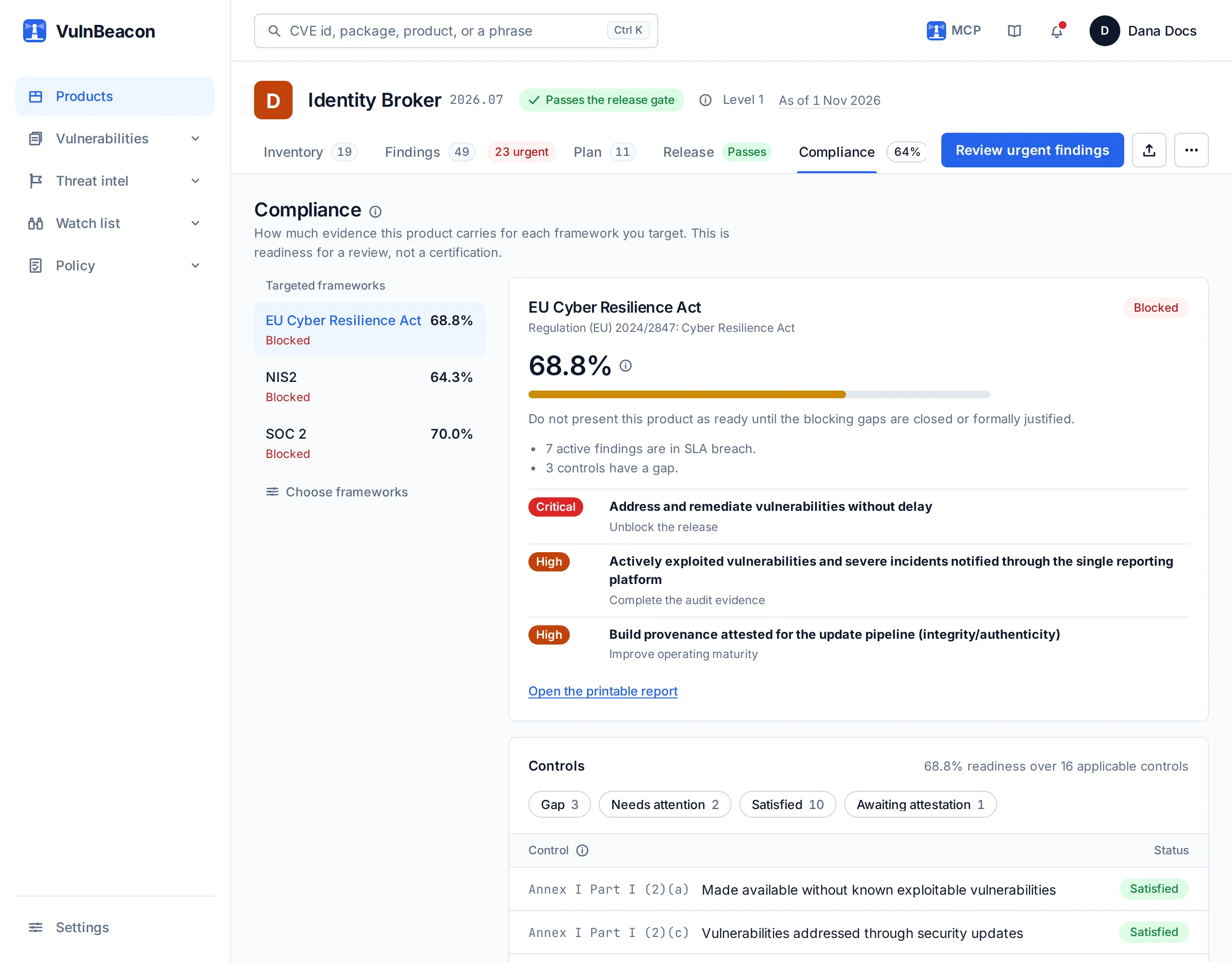
Readiness against eight frameworks
The same facts are measured every night against the controls of each framework you target. Each control shows its answer and the evidence line that produced it. The figure is readiness for a review, never a certification, and the page says so.
From a list of findings to work you can follow
A long list of findings tells nobody what to do on Monday. The plan turns it into upgrades, ranks them by what each one clears, and follows them across your next builds.
A prioritised plan
Findings are grouped by the upgrade that closes them, and the upgrades are ranked by how much each one clears, so the first line is the place to start. Where no fixed version exists yet, the plan says so instead of leaving a blank. A malicious package is marked for removal, since there is nothing to upgrade to.
See the effect before you commit
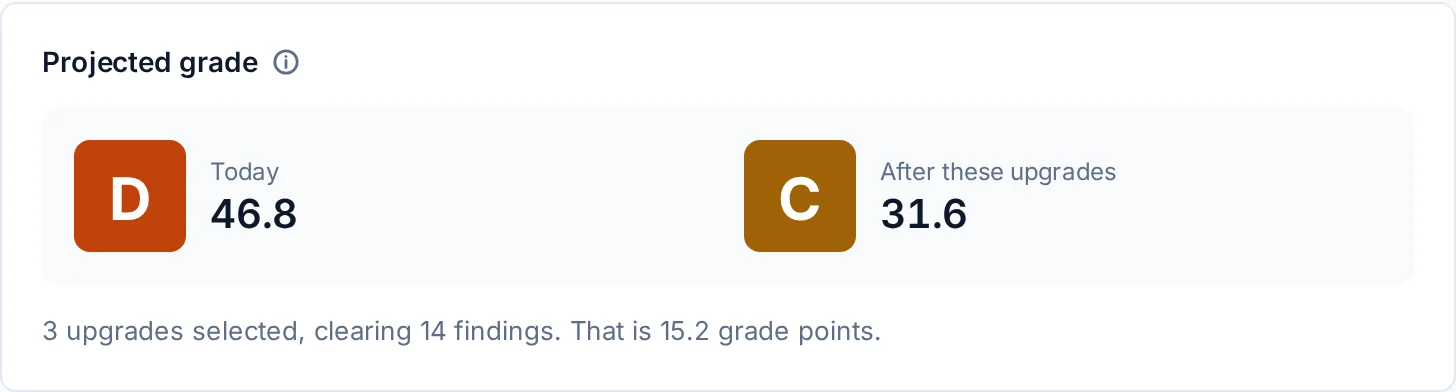
Tick the upgrades you are considering and the plan projects the grade they would leave, and which rules of the release gate they would clear.
Tickets and campaigns
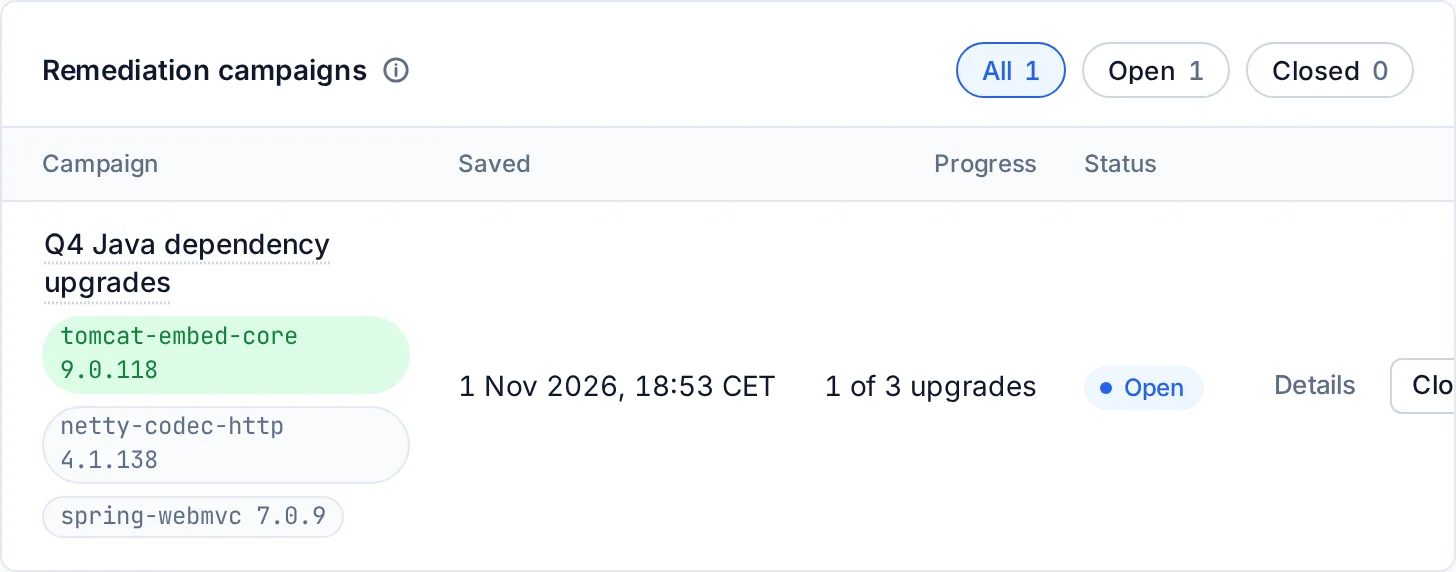
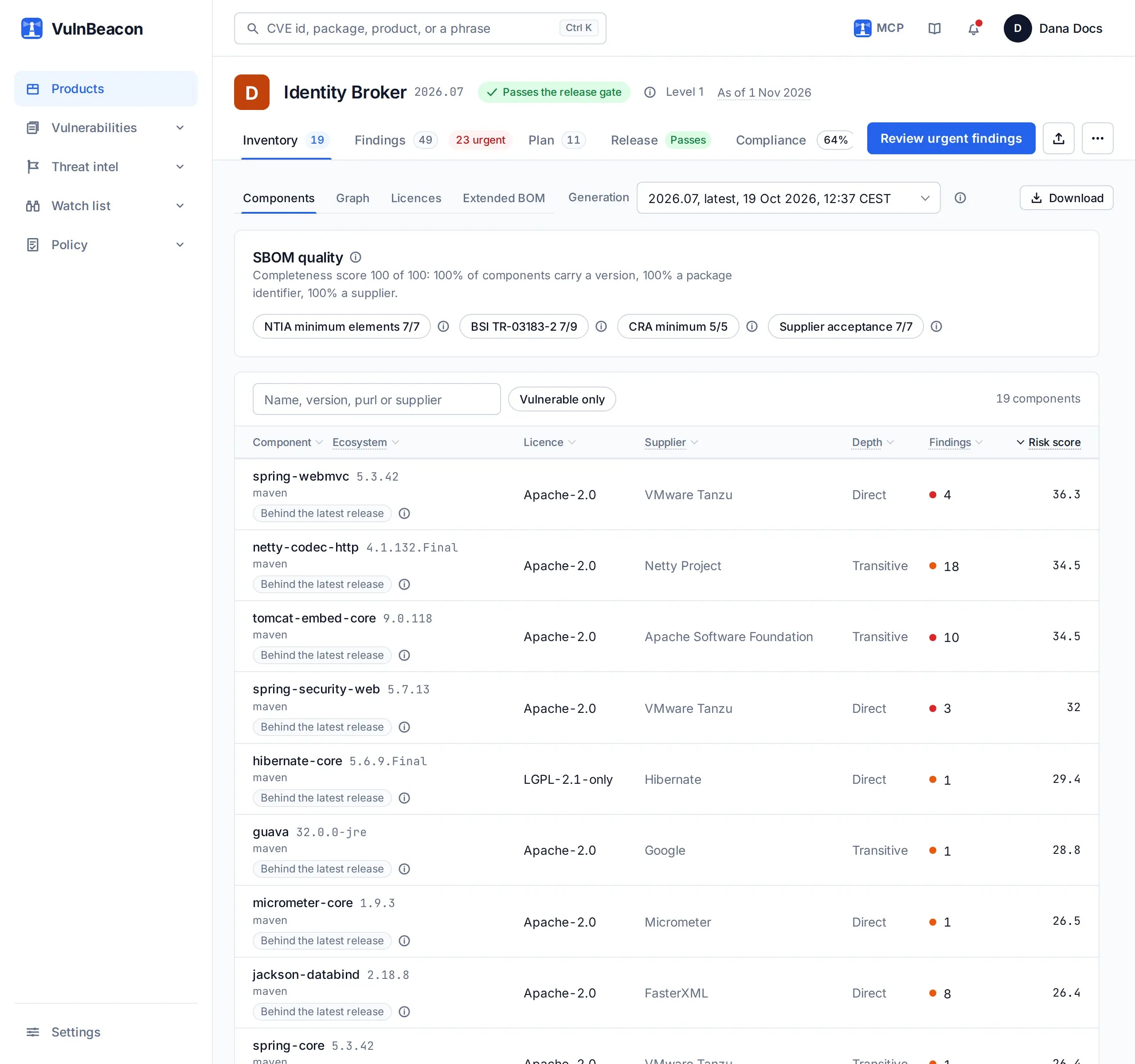
File an upgrade as a ticket in Jira or ServiceNow with its findings attached, or group several into a campaign. Each new SBOM generation shows which of a campaign’s upgrades actually landed, so nobody has to ask.
Ask for the first move
The assistant reads the same verdict and the same plan, so anyone on the team can ask why a release is blocked and what to do first.
-
You
Why is the release gate blocking Platform Worker Image, and what should we fix first?
-
Assistant
The release gate blocks Platform Worker Image. Rules broken: malicious packages (eslint-plugin-restart-vega-soap@1.0.0, py-infopullhydra@1.0.0). First remove eslint-plugin-restart-vega-soap@1.0.0 and py-infopullhydra@1.0.0: no upgrade clears a malicious package. Then upgrade openssl 3.0.19-1~deb12u2 to 3.0.20-1~deb12u2, which clears 9 findings. Check the release again once that is done.
- Remove
eslint-plugin-restart-vega-soap@1.0.0 - Remove
py-infopullhydra@1.0.0 - Upgrade
openssl 3.0.19-1~deb12u2 → 3.0.20-1~deb12u2clears 9
- Remove
-
How the assistant answered3 calls, 1.4 s
-
list_products11 products.
131 ms
-
product_gateproduct_id: 10Blocked: max_malicious.
1.2 s
-
product_remediationproduct_id: 106 components to act on. openssl 3.0.19-1~deb12u2 to 3.0.20-1~deb12u2 clears 9 findings.
125 ms
-
Recorded on the example product Platform Worker Image: the gate's verdict and the plan's first lines.
The same rules, before a change merges
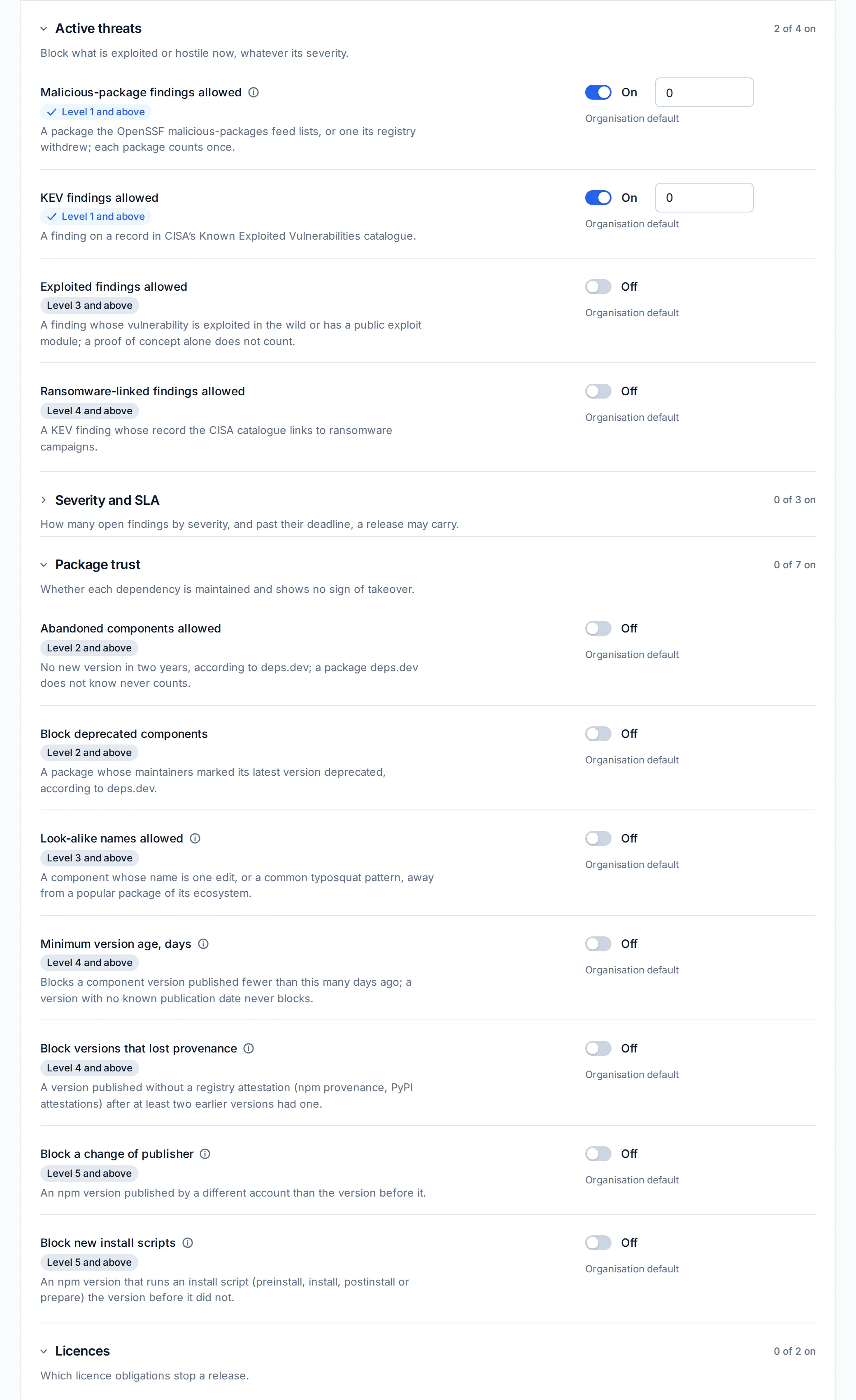
A pull request that adds a dependency is the cheapest moment to refuse it. The pull-request check reads the candidate SBOM against the product without changing it, and answers with the rule it tripped on.
What the gate judges on every change
- Malicious packages
- None allowed by default. A package the feeds or its registry name as malicious fails the check.
- Look-alike names
- A name one or two letters away from a package everyone uses.
- Abandoned or deprecated
- No release in two years, or deprecated by its maintainers.
- Young versions
- A version published fewer days ago than the number you set.
- Lost provenance
- A version without the registry attestation its predecessors carried.
- Changed publisher
- A version published by another account than the version before it.
- New install script
- A version that added a script run at install time.
- Exploited findings
- Records exploited in the wild, or tied to ransomware campaigns.
- Licence restrictions
- Licences that restrict commercial use, distribution or modification, as you list them.
Each rule is a switch in your policy, and the same rules decide the release gate.
-
You
Our pull request on Payments API adds eslint-plugin-restart-vega-soap 1.0.0. Will it pass the release gate?
-
Assistant
No. The pull request would block the release gate of Payments API. Rules broken: malicious packages (eslint-plugin-restart-vega-soap@1.0.0). New in this pull request: CVE-2026-4800, MAL-2025-19862, CVE-2025-13465.
-
How the assistant answered1 call, 5.1 s
-
check_sbomproduct_id: 1, sbom: CycloneDX 1.6, 2 components, branch: add-eslint-plugin-restart-vega-soapBlocked: max_malicious (eslint-plugin-restart-vega-soap@1.0.0). 4 new findings.
5.1 s
-
Recorded against the example product Payments API: a candidate SBOM carrying the dependency the pull request adds, checked without changing the product.
The ready-made jobs for GitHub Actions, GitLab CI, Jenkins, Bitbucket Pipelines and Azure Pipelines run the check on each pull request and upload each release build's SBOM. A blocked verdict, or a scan that did not finish in time, fails the job.
Hold what suppliers deliver to your own requirements
The software you buy ends up in what you ship. Ask each supplier for an SBOM, and judge it the way you judge your own.
A key for each delivery
A Supplier key uploads for one product and reads back only the result of its own delivery, never a finding. The supplier needs no account, and the delivery is matched like any other generation of the product.
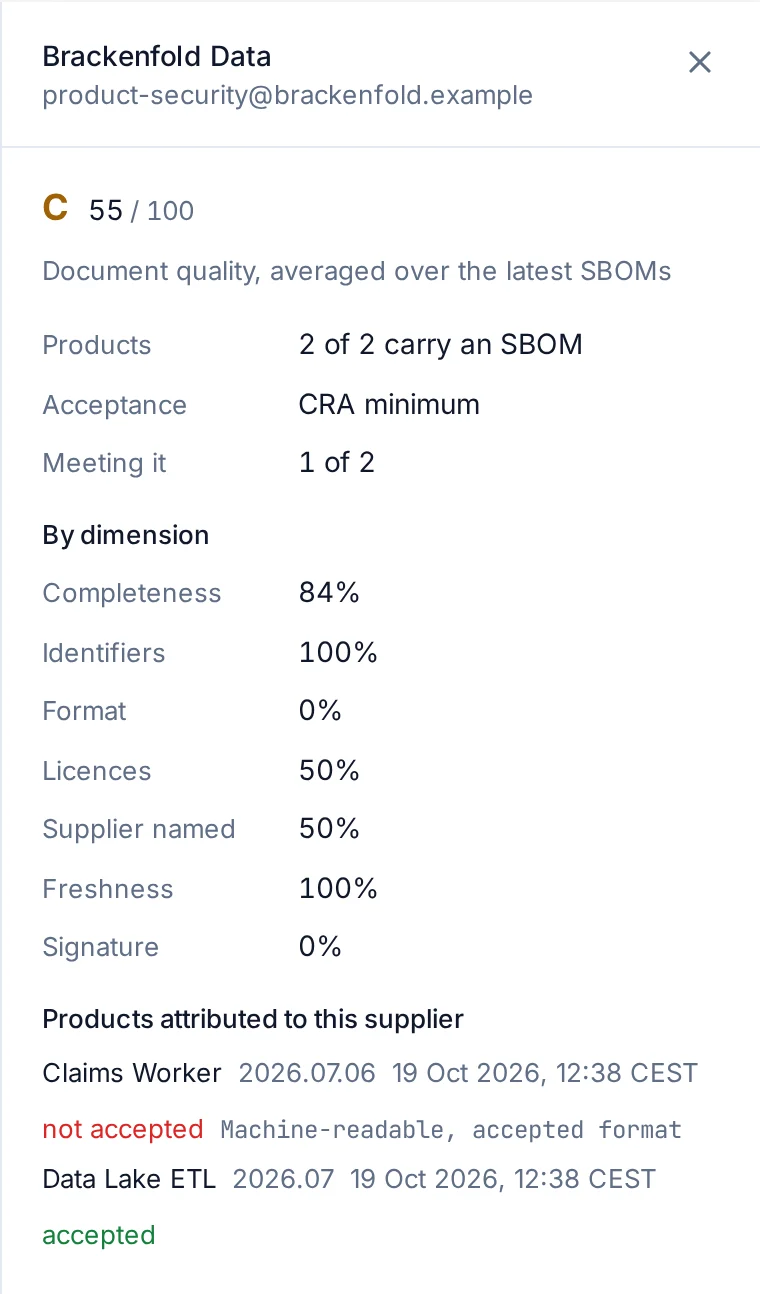
A scorecard for each supplier
Each supplier’s scorecard averages completeness, identifiers, format, licences, supplier data, timeliness and signatures across the latest SBOMs of the products they deliver.
An acceptance profile
Choose the profile a supplier’s SBOMs are judged against, such as the Cyber Resilience Act minimum. The answer is per product, so you can see which delivery falls short and why.
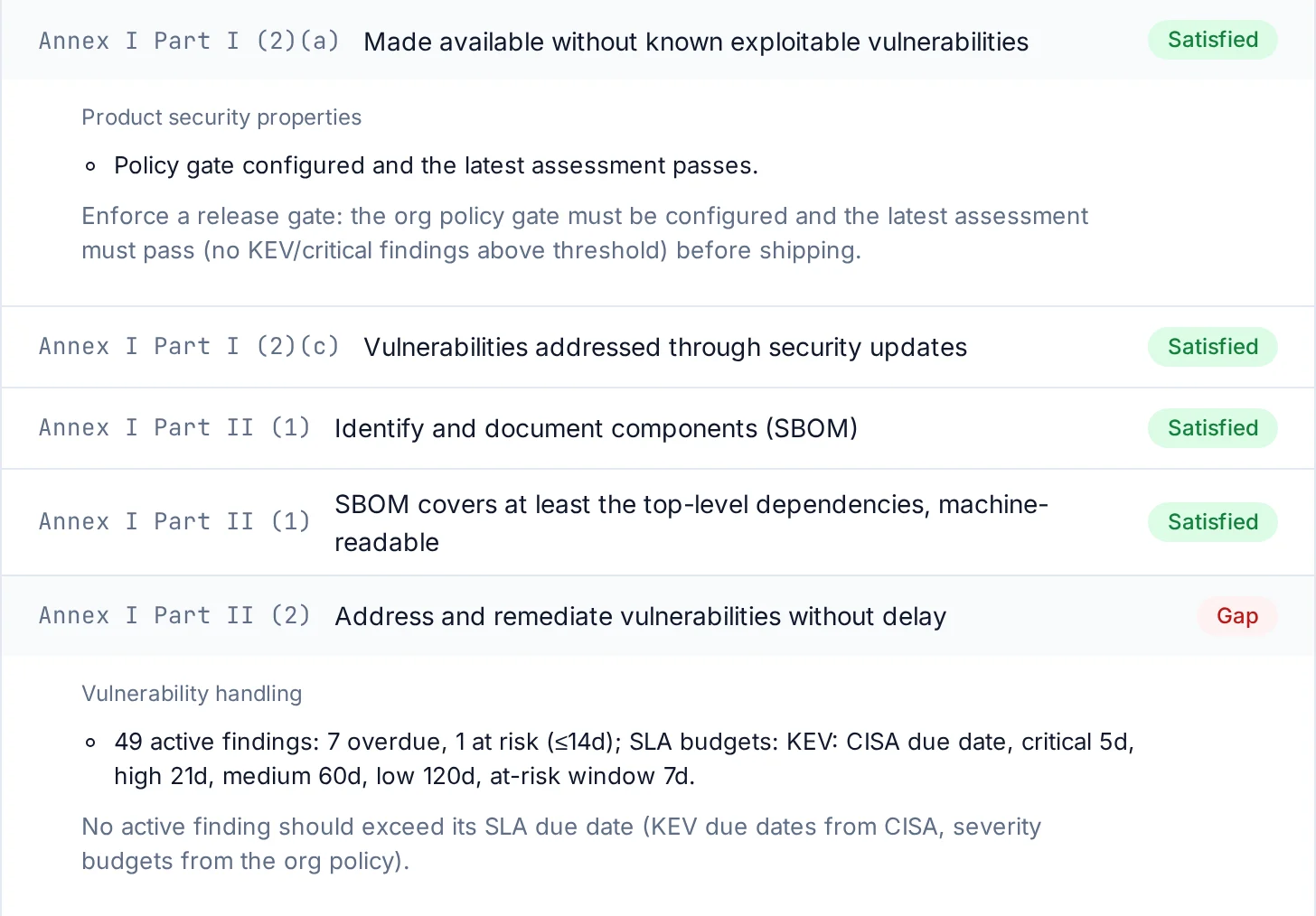
Eight frameworks, one set of facts
The scan that grades a product also answers the controls of the frameworks it targets.
- EU Cyber Resilience Act
- NIS2
- SOC 2
- ISO/IEC 27001
- PCI DSS v4.0.1
- NIST SSDF
- BSI TR-03183
- EU AI Act
The four answers a control can give
- Satisfied
- The facts meet the control.
- Needs attention
- Something to look at before the review.
- Gap
- The facts fail the control.
- Awaiting attestation
- A person confirms it, with a note or a link.
Readiness is the share of applicable controls that are satisfied, a control that needs attention counting as a half. It is a figure for review, never a certification, and the report says so in plain words. It is measured every night, so a regression reaches your alerts before it reaches the audit.
The printable report carries a running header, a table of contents when it is long, and an appendix with the framework's own text for every control it cites.
Evidence you can hand over
A VEX documents why a vulnerability does or does not affect your product, and it is written from the facts VulnBeacon holds. The vulnerability disclosure report, the SARIF, the evidence pack and the printable reports are dated and carry the product’s name. To show a customer one report, share a read-only link with an expiry date and, if you want, a password.
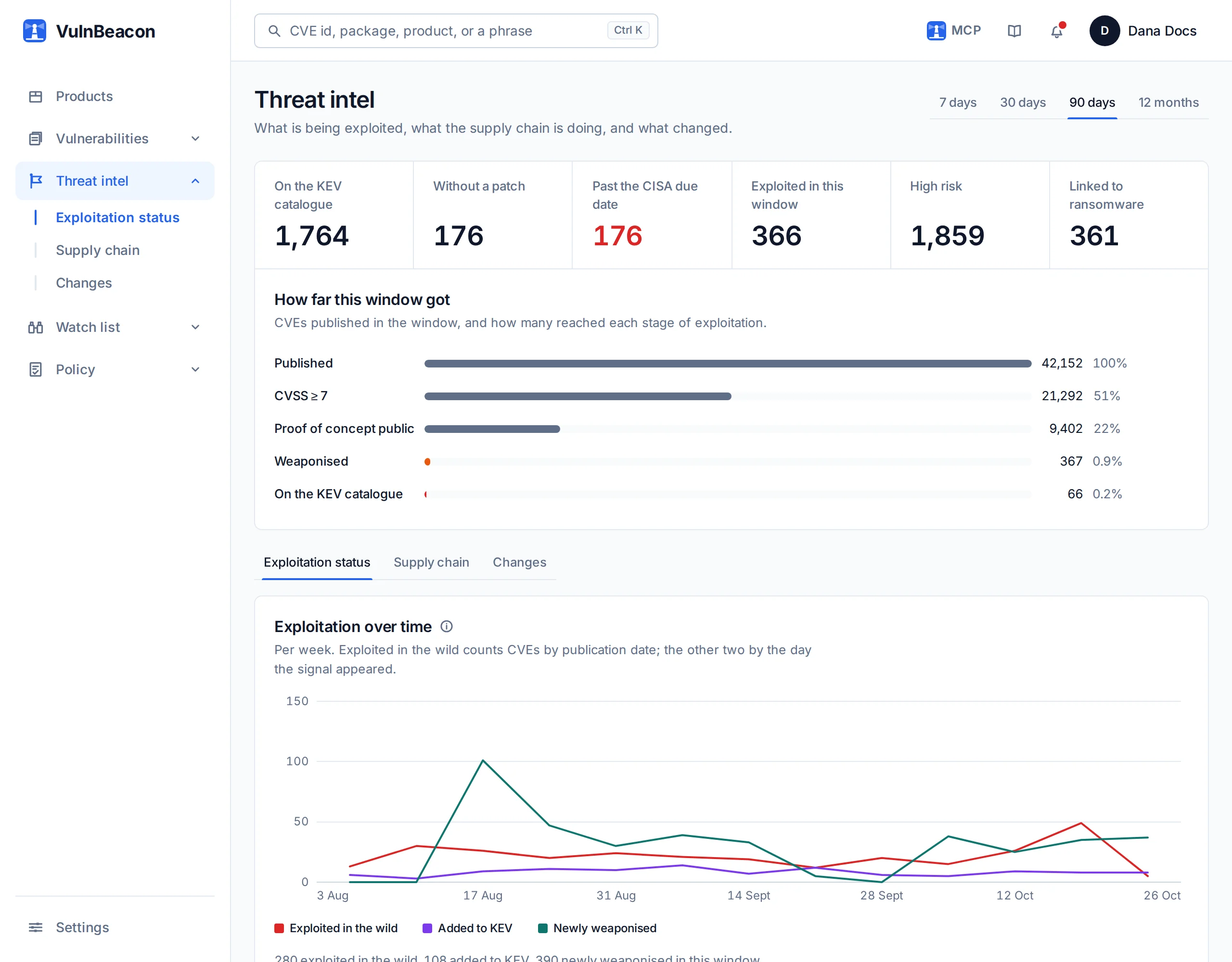
Vulnerability intelligence: one record, from 86 sources
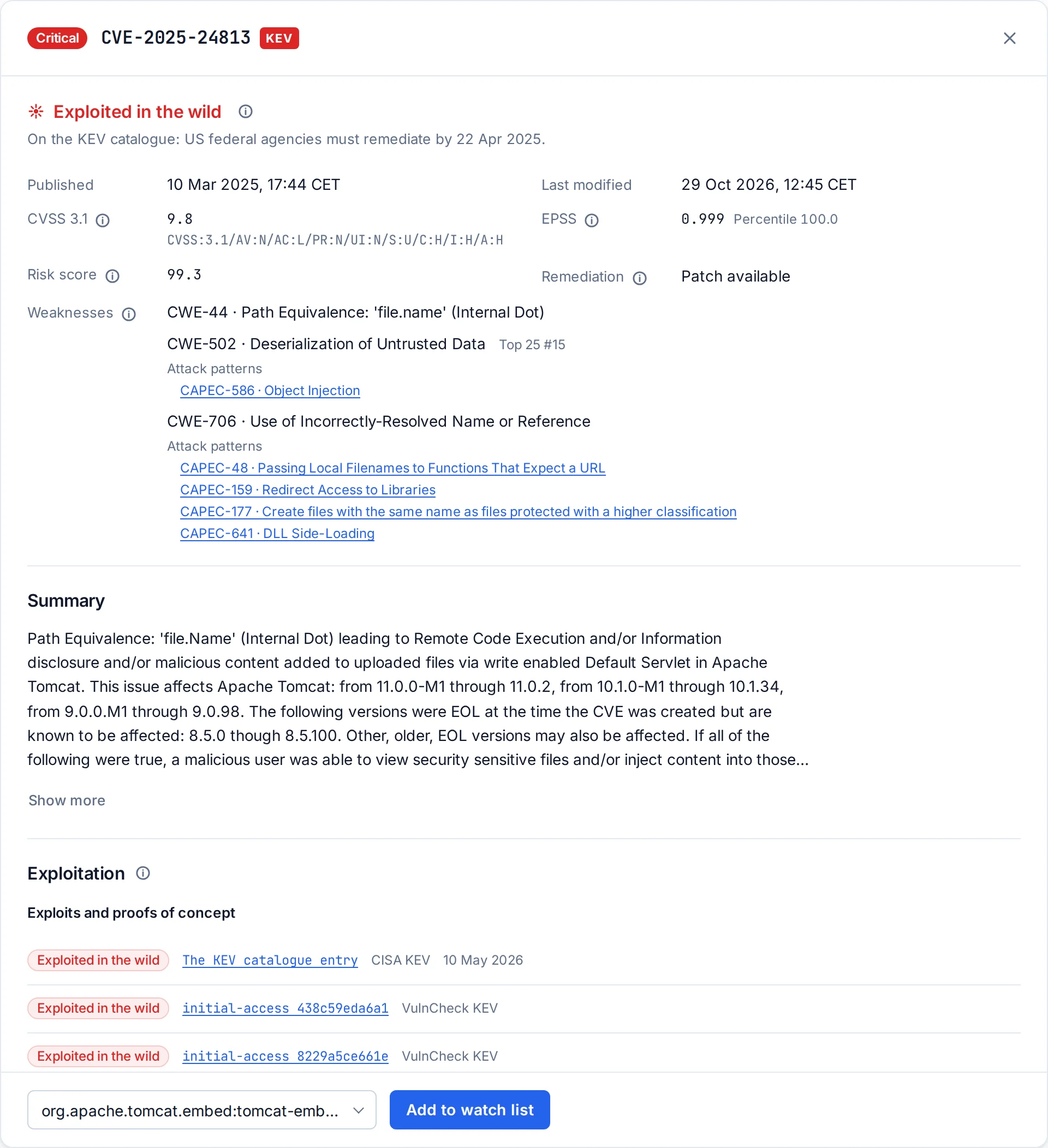
Behind every grade is one record per vulnerability. The CVE list, the NVD, GitHub's advisories, OSV, the CISA KEV catalogue, EPSS, the vendors' own advisories, national CERTs and the malicious-package feeds are merged into it, so you read one record instead of reconciling five.
malicious packages in the record, 1,108 of them published in the last 30 days
Packages published to do harm
Attackers no longer wait for a flaw; they publish the package. A scanner that looks only for CVE identifiers never sees them.
records on the CISA catalogue of known exploited vulnerabilities, 32 of them added in the last 30 days
Exploitation before the score
A score says how bad a flaw could be; exploitation says it is happening. 32,423 records carry evidence of exploitation in the wild or a weaponised exploit.
- EU Cyber Resilience Act
- NIS2
- PCI DSS v4.0.1
ask for the proof, not the intent
Regulation that asks for proof
An SBOM, a vulnerability handling process, the evidence that it ran, and a reasoned answer for each vulnerability that does not affect you. A spreadsheet assembled the week before the audit does not hold up.
Names one letter away from the real one
The malicious packages hide behind names one letter away from the real ones, install scripts that fetch a binary, and versions pushed by an account nobody knows. The record holds them beside the vulnerabilities, with the registry's own verdict when it has one, so the inventory of a product is judged on both at once.
Sorted by what is happening, not by a score
Sorted by CVSS alone, the exploited records sit among thousands that nobody attacks. VulnBeacon reads the KEV catalogue, the exploitation evidence and the EPSS probability into every record, and the findings of a product come out exploited first.
The proof the regulation asks for
The EU Cyber Resilience Act, NIS2 and PCI DSS v4.0.1 ask for the proof, not the intent. The reasoned answer for a vulnerability that does not affect you is what a VEX is, and VulnBeacon writes it from the facts it holds.
The record, this month
| New CVE recordsPublished in the last 30 days | 15,679 |
|---|---|
| MAL Malicious packagesPublished in the last 30 days | 1,108 |
| KEV Known exploitedAdded to the CISA catalogue in the last 30 days | 32 |
| SourcesMerged into one record per vulnerability | 86 |
| CVE records | 395,743 |
|---|---|
| Advisories | 2.7 million |
| Malicious packages | 245,222 |
Each record shows when it was last modified.
Ask the record directly
The same record answers an assistant. These two sessions were recorded against it: a week’s critical vulnerabilities, and the latest remote code execution records.
-
You
Which critical vulnerabilities were published this week?
-
Assistant
273 critical records were published since 23 October. The newest: CVE-2026-76024 (Chrome, critical, fix available), CVE-2023-22793 (Management Pack for Microsoft System Center, CVSS 9.3, fix available), CVE-2026-61707 (CoPilot, CVSS 9.0, fix available), CVE-2026-61645 (docat, CVSS 9.1, fix available) and CVE-2026-103093 (ServiceNow AI Platform, CVSS 9.4). None of them is on the KEV catalogue yet.
CVE-2026-76024criticalChromefix availableCVE-2023-22793criticalCVSS 9.3Management Pack for Microsoft System Centerfix availableCVE-2026-61707criticalCVSS 9.0CoPilotfix availableCVE-2026-61645criticalCVSS 9.1docatfix availableCVE-2026-103093criticalCVSS 9.4ServiceNow AI Platform
-
How the assistant answered1 call, 112 ms
-
search_corpusseverity: critical, since: 2026-10-23, per_page: 5273 records; the 5 newest:
112 ms
-
Recorded against the record: the critical records of the last seven days, newest first, the five newest listed.
-
You
List the latest remote code execution CVEs.
-
Assistant
202 records published since 23 October describe remote code execution. The 5 newest: CVE-2026-110133 (Red Hat Enterprise Linux 10, CVSS 5.8), CVE-2026-119271 (Chrome, high, fix available), CVE-2026-119270 (CacheStorage in Google Chrome, high, fix available), CVE-2026-119269 (Blink in Google Chrome, high, fix available) and CVE-2026-119268 (Editing in Google Chrome, high, fix available). A fix exists for 4 of the 5.
CVE-2026-110133mediumCVSS 5.8Red Hat Enterprise Linux 10CVE-2026-119271highChromefix availableCVE-2026-119270highCacheStorage in Google Chromefix availableCVE-2026-119269highBlink in Google Chromefix availableCVE-2026-119268highEditing in Google Chromefix available
-
How the assistant answered1 call, 1.3 s
-
search_corpusq: remote code execution, tier: cve, since: 2026-10-23, per_page: 5202 records; the 5 newest:
1.3 s
-
Recorded against the record: the CVE records of the last seven days whose text describes remote code execution, newest first.
An assistant that answers from your products and the record
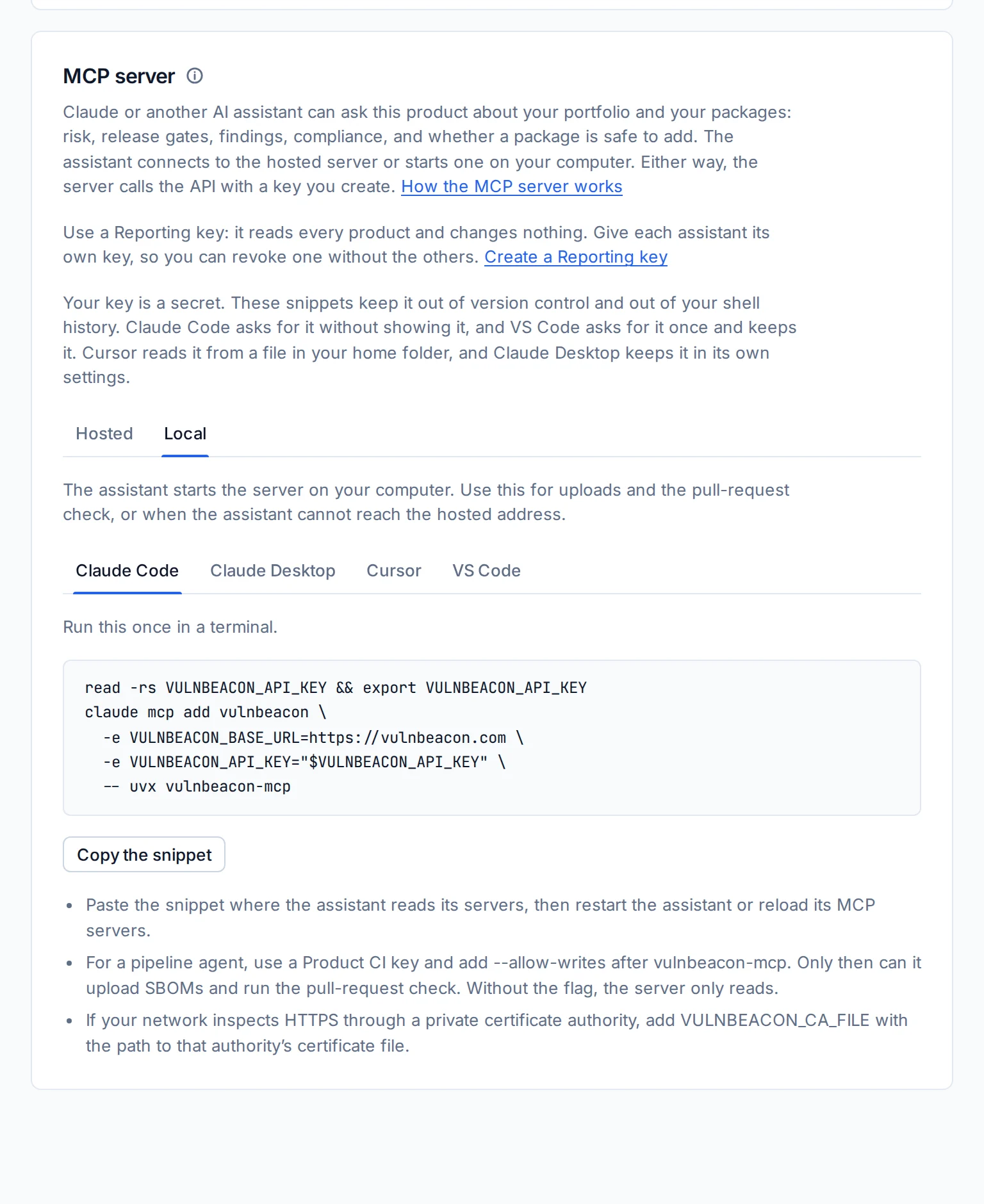
VulnBeacon ships an MCP server, so an assistant such as Claude, Cursor or VS Code can ask in your words. It calls the same API the application uses, with your key, and answers from the same facts. It is one way in: the web application and your CI jobs reach the same capabilities. The sessions on this page were recorded that way, on example products.
What it can ask
- A product's decisionThe grade and its reasons, the gate verdict, the findings, a prioritised plan, the trend, the advisory to publish, the whole portfolio.
product_risk, product_gate, product_findings, product_remediation, product_trend, product_advisory, portfolio_summary, list_products - An SBOMUpload a build's SBOM, check a pull request's candidate without touching the product, compare two generations.
upload_sbom, check_sbom, sbom_diff - The recordA vulnerability by any of its identifiers, the packages it affects, a package by its purl with its malicious status, a search over the whole record, the impact of an incident on your products.
cve_lookup, cve_packages, package_lookup, search_corpus, incident_impact - ComplianceReadiness per framework and the report with every control's answer.
compliance_summary, compliance_report - Your watchThe watch lists, what changed for them, the alerts feed.
list_watchlists, watchlist_changes, alerts_feed - The rules and the keyThe policy in force for the account, and what the key in use may do.
effective_policy, key_info
Local or hosted
Locally, uvx vulnbeacon-mcp runs the server on your machine for Claude Code, Claude Desktop, Cursor or VS Code. Hosted, the same tools answer at https://mcp.vulnbeacon.com/mcp, with your key sent in each request.
The key decides what it can do
A Reporting key reads every product of your account and changes nothing. A Product CI key also uploads an SBOM and runs the pull-request check, for the products it names. No key changes a policy or a decision; those change in the application only.
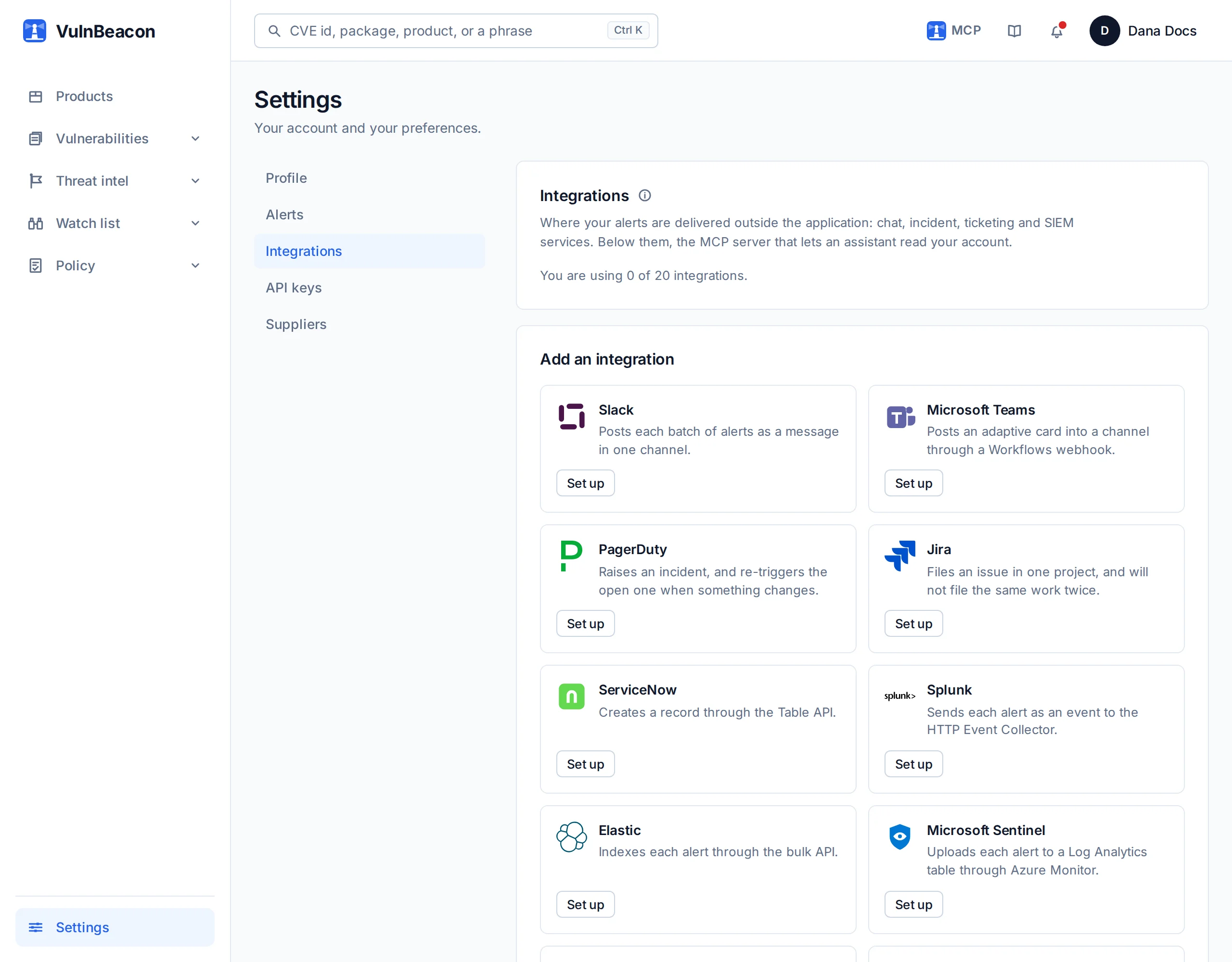
Where the team already is
Alerts go to the channel that will be read, and the pipeline does the uploading.
- SlackChat
- TeamsChat
- PagerDutyOn-call
- JiraTickets
- ServiceNowITSM
- SplunkSIEM
- ElasticSIEM
- SentinelSIEM
- GitHubSCM
- GitLabSCM
- E-mail alertsBuilt-in
Routing rules decide which alert kind, which severity and whether a KEV listing reaches each integration. A ticket reaches Jira or ServiceNow with the finding attached. An integration that keeps failing pauses itself and tells you, and only allowed hosts are ever contacted.
How it works, and what happens to your data
Your scanner keeps listing what is in the build. VulnBeacon adds what happens next: what that list now means, who has to act, and what you can show for it.
Beside the tools you already run
Syft, Trivy, Grype and your SBOM tools produce the inventory, as CycloneDX, SPDX, a supported lockfile or the scanner’s own output. VulnBeacon reads it against a record kept up to date from 86 sources, and reads it again when the record changes, with no new scan. Your scanner tells you what it found today. VulnBeacon follows each product from there: which ones a new flaw reaches, what to fix first, whether the fix landed, and whether the release meets your policy.
Three ways in, one set of answers
The web workspace holds everything, with nothing to install. Your pipeline uploads each SBOM and checks each pull request with a key that names its products. An AI assistant is optional: it reads through the same API with a key you choose, so an organisation that has not approved one still has the whole product.
Where it runs
Every offer is your own instance, operated by us. Enterprise can also run on your own machines.
What you send, and where it goes
- What you upload
- SBOMs and dependency manifests, not source code. They can still reveal details of a project, so remove any personal information or secret the analysis does not need.
- Hosting
- Datacentres in the European Union. That does not keep every flow inside it: the services below can involve processing outside the European Economic Area.
- In transit
- Every connection passes through a network-protection provider, which processes what each request carries while it is in transit, documents included.
- Package lookups
- To judge dependency health and run the pull-request check, package identifiers go to public package-intelligence services and, for npm and PyPI, to their registries. Identifiers only, never a whole SBOM. A private package’s name can still reveal something: tell us if your lookups need restricting.
- Integrations
- An integration receives what you send it, and nothing reaches one you have not configured.
- Assistants
- If you connect one, its provider processes your prompts, the information retrieved and the answers under its own terms. We do not use your information to train AI models.
- On your own machines
- All of this describes the instance we operate. An Enterprise instance on your own machines is hosted under your control, on your network. Package lookups still go out unless you ask us to restrict them.
The privacy notice names each provider and has the full detail, and the terms of service what you may upload.
Offers
Every offer runs as your own instance, operated by us. Enterprise can also run on your own machines.
| Team Fits these figures €900 a month, billed annually, excl. VAT 10 products For a team shipping a handful of products. Request Team | Business Fits these figures €2,400 a month, billed annually, excl. VAT 50 products For an organisation with a portfolio to keep clear. Request Business | Enterprise Fits these figures from €5,000 a month, billed annually, excl. VAT 200 products For a large portfolio, or an instance on your own machines. Request Enterprise | |
|---|---|---|---|
| Where it runs | Your own instance, run by us | Your own instance, run by us | Your own instance, run by us or on your machines |
| Price a year, excl. VAT | €10,800 | €28,800 | from €60,000 |
| Support | Not included | Not included | Included |
| SBOM generations kept, per product | 10 | 25 | 50 |
| Uploads and pull-request checks a month | 10,000 | 50,000 | 200,000 |
| Components in one SBOM | 5,000 | 10,000 | 10,000 |
| Components across all products | 20,000 | 100,000 | 400,000 |
| Alert integrations | 10 | 20 | 50 |
| Reporting keys | 5 | 10 | 25 |
| API requests a minute, per key | 300 | 300 | 600 |
| API requests a month, per key | 100,000 | 100,000 | 500,000 |
How the limits read
- One product
- Whatever you track as one: an application, a service or an image. A new version is a new SBOM generation of the same product, not another product.
- Reaching a limit
- What you already have stays as it is. An upload or check past the month’s quota waits for the next month, a new product past the limit is refused, and an SBOM over a component limit is refused with both figures. A deleted product that was in use keeps its place for 30 days.
- Users, onboarding, evaluation
- Tell us what you need in your request, and a person answers.
In every offer
- A grade with its reasons, and a prioritised remediation plan
- The release gate and the pull-request check, on your rules
- VEX, exports and the evidence pack
- Readiness against every framework we cover
- One record of vulnerabilities and malicious packages, kept from 86 sources
- The assistant over MCP, hosted or on your machine
- Alerts and tickets in the tools you already use
- Supplier keys, for the SBOMs your suppliers deliver
Start with one product
Start with one product: bring its inventory and see its exposure, prioritised fixes, release-policy result and evidence. Explore a sample product assessment first, if you want something to read or share. Accounts are created for you once we have read your request. Tell us your name, your organisation and what you ship. Once your account exists, the first grade takes about a minute after your first upload.